

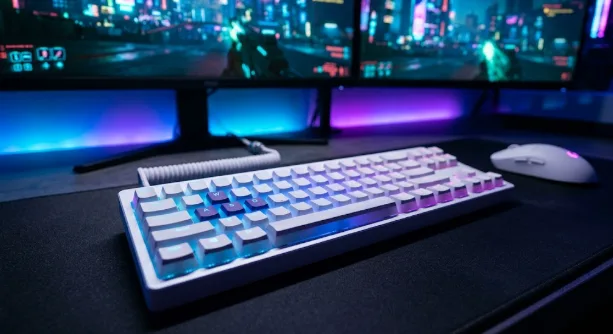
I’ve spent the better part of a decade testing peripherals, and I’ll be the first to admit that I’m a sucker for a clean, “Stormtrooper” aesthetic. There is something about an all-white desk setup that just makes the RGB pop and the workspace feel less cluttered. But here is the catch: finding the best white gaming keyboard models isn’t just about picking the brightest plastic.
You’re looking for gear that won’t yellow after six months of sunlight and hardware that actually packs the latest 2026 tech like Hall Effect sensors or 8000Hz polling. I’ve gone through dozens of boards that looked great on Instagram but felt like hollow toys under my fingers. After months of clicking, clacking, and occasionally spilling coffee on pristine white PBT, I’ve narrowed down the field to the absolute elite.
The State of White Peripherals in 2026
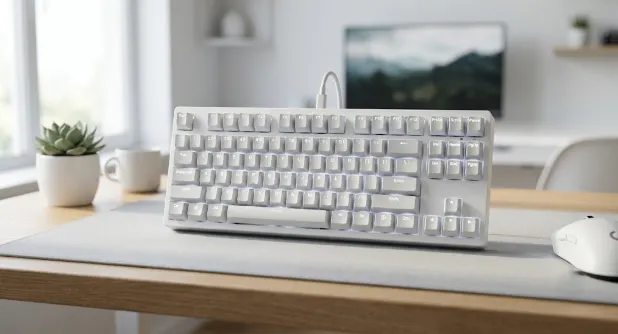
The best white gaming keyboards in 2026 are defined by their use of high-quality Double-shot PBT keycaps to prevent staining, Hall Effect (magnetic) switches for Rapid Trigger performance, and multi-mode wireless connectivity. The current leaders are the Wooting 60HE+ (White Alumaze), the ASUS ROG Azoth (Moonlight White), and the Logitech G715 for its unique cloud-like aesthetic.
For a long time, white keyboards were an afterthought. Manufacturers would just take their black flagship and slap some white paint on it, leading to “light bleed” issues where the RGB looked messy through the thin plastic. Now, the market has shifted toward enthusiast-grade materials. You don’t have to settle for cheap ABS plastic that gets shiny and greasy within a month. The top tier boards now use dense, textured PBT that feels premium and stays white. I’ve noticed that the best setups currently prioritize “creamy” sound profiles-meaning the internal foam and gaskets are just as important as the color of the chassis.
- PBT Keycap Material: Look for double-shot PBT because the legends will never fade, and the plastic itself is far more resistant to the oils on your skin.
- Rapid Trigger Technology: If you’re playing competitive shooters, magnetic switches are no longer optional; they provide a physical speed advantage that traditional mechanical switches can’t touch.
- Internal Sound Dampening: A premium white board should sound deep and muted, not like a hollow echo chamber, which is a common flaw in cheaper budget white models.
1. Wooting 60HE+ (White Alumaze Edition)
If you ask any pro-level Valorant or CS2 player what they’re using, there’s a massive chance they’ll point to a Wooting. The 60HE+ in the White Alumaze case is easily one of the best white gaming keyboard picks because it pioneered the Hall Effect revolution. I remember when I first tried their Rapid Trigger feature; it felt like I was cheating. The key resets the instant you start lifting your finger, making counter-strafing feel instantaneous. This specific white version isn’t just a color swap; the aluminum case gives it a heavy, high-end weight that keeps it from sliding around your desk during a frantic clutch. It’s a minimalist’s dream that hides a savage competitive edge.
- Lekker Magnetic Switches: These allow you to customize your actuation point from a hair-trigger 0.1mm to a deep 4.0mm, depending on whether you’re gaming or typing.
- White Alumaze Chassis: The finish is a matte, slightly textured white that hides fingerprints exceptionally well and feels much cooler to the touch than plastic.
- Web-Based Software: You don’t have to install bloated background apps; you just open a browser tab to change your settings, which keeps your PC running lean.
2. ASUS ROG Azoth (Moonlight White)
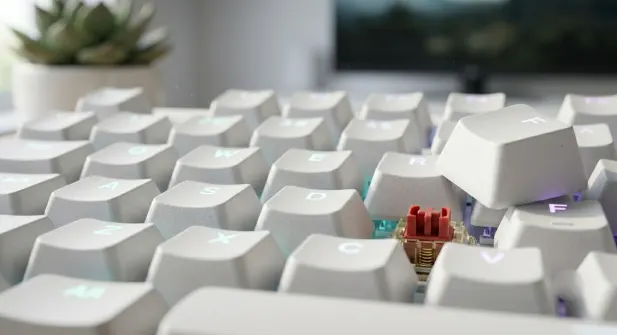
The original Azoth changed the expectations for “mainstream” keyboards, and the Moonlight White version is a stunning piece of industrial design. It’s essentially a custom enthusiast board that happens to be made by a massive tech giant. I’ve been using this on my main productivity desk because the typing feel is incredibly bouncy and soft, thanks to its sophisticated gasket mount system. It also features a small OLED screen in the corner that you can customize with your own GIFs or system stats. While some might call it a gimmick, I’ve found it genuinely useful for checking my CPU temps without having to minimize my game.
- Tri-Mode Connectivity: It supports Bluetooth, 2.4GHz wireless with a speed-optimized dongle, and wired modes, making it perfect for switching between a Mac and a gaming PC.
- Pre-Lubed Switches: Most big brands have scratchy switches, but ASUS lubes these at the factory, so they feel buttery smooth right out of the box.
- Built-in Lube Station: It actually comes with a kit to re-lube your switches yourself, which is a huge nod to the hardcore keyboard community.
Looking for the best options? Check out our complete guide on Best Gaming Keyboard
3. Logitech G715 Wireless (Aesthetic Champion)
I’ll be honest, the Logitech G715 is probably the most comfortable board I’ve ever rested my wrists on. It’s part of their Aurora Collection, which was designed with a focus on softer edges and inclusivity. It comes with a literal cloud-shaped wrist rest that looks ridiculous in photos but feels amazing during a six-hour session. The lighting on this board is different too; instead of just “gamery” colors, it has a soft, diffused glow that looks more like a neon sunset. It’s a bit of a departure from the sharp, aggressive lines of most gaming gear, and it’s a refreshing change for anyone tired of the “tactical” look.
- Cloud Wrist Rest: It’s incredibly soft and perfectly matches the white aesthetic of the board, providing great support for long typing marathons.
- LIGHTSPEED Wireless: Logitech’s wireless tech is still the industry benchmark for zero-latency connections, so you’ll never feel a delay in fast-paced titles.
- Media Control Cluster: It has a dedicated volume roller and playback buttons that feel sturdy and tactile, which is great for people who constantly listen to music while they play.
Maintaining Your White Gaming Setup
Let’s address the elephant in the room: white keyboards get dirty. I’ve learned the hard way that if you’re someone who eats Cheetos at your desk, you’re going to have a bad time. However, it isn’t nearly as high-maintenance as people think if you use the right tools. A simple micro-fiber cloth and some 70% isopropyl alcohol once a week will keep the chassis looking fresh. If you have the best white gaming keyboard models mentioned here, they all feature high-quality PBT or coated aluminum, which are much easier to clean than the cheap, porous plastic found on budget boards.
- Avoid Direct Sunlight: Even the best plastics can eventually discolor if they are sitting in 100-degree direct sun all day, so try to keep your setup slightly away from the window.
- Use an Air Duster: Crumbs and dust show up instantly against a white baseplate, so a quick blast of compressed air every few days goes a long way.
- Deep Clean Every 3 Months: Pull the keycaps off and give the plate a thorough wipe-down to prevent that “grey” dust buildup from becoming permanent.
FAQ Section
Do white keyboards yellow over time?
Older keyboards did because of a flame retardant called bromine, but modern high-quality white gaming keyboards use better plastics and UV-resistant coatings. If you stick to PBT keycaps, they are highly resistant to yellowing.
What is the best way to clean a white keyboard?
Use a slightly damp microfiber cloth for the case. For the keycaps, you can actually soak them in warm soapy water (never hot!) if they get really grimy. Avoid using harsh bleach or abrasive cleaners.
Is there a wireless white gaming keyboard with no lag?
Yes, both the ASUS ROG Azoth and the Logitech G715 use specialized 2.4GHz wireless dongles that provide 1ms response times, making them just as fast as a wired connection.
Does white RGB look better than black RGB?
Yes. White surfaces reflect light rather than absorbing it, so the colors look much more vibrant and the “glow” effect around the keys is significantly more pronounced.
Conclusion
Keeping your desk looking pristine is a commitment, but the payoff is a workspace that actually feels inspiring to sit at. Whether you want the raw, unapologetic speed of the Wooting or the luxurious, cloud-like comfort of the Logitech, choosing from the best white gaming keyboard picks ensures you aren’t sacrificing skill for style. I’ve found that my own mood actually improves when my setup looks this organized and clean. Just remember to wash your hands before you sit down to play, and your white board will stay looking like it just came out of the box for years to come.