

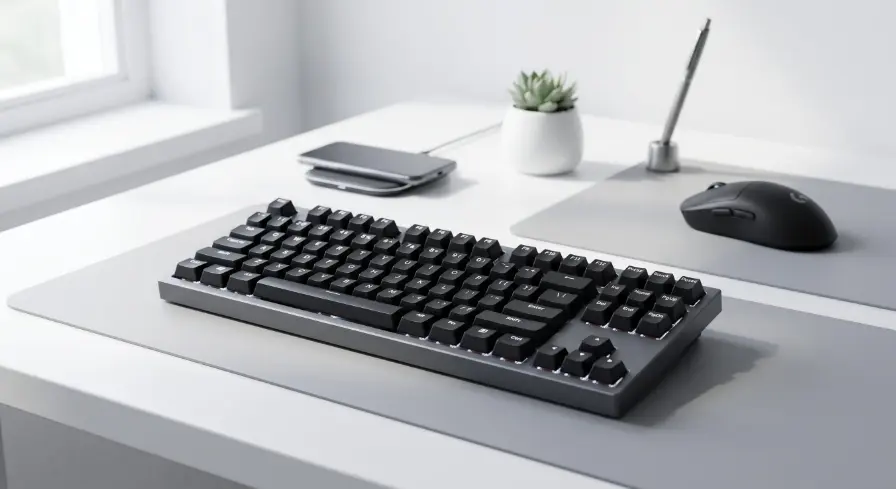
It’s 2 AM, your palms are sweaty, and you just missed a crucial ultimate ability because your ‘S’ key decided to take a nap. We’ve all been there. Getting crushed in a competitive lobby is frustrating enough, but losing a gunfight because of cheap, sticky plastic keys is just insulting. You start browsing online stores and immediately get hit with a wave of aggressive marketing jargon demanding you spend two hundred dollars to climb the ranks. The good news? You absolutely don’t need to drain your bank account to get reliable, competitive hardware.
I spent the last few weeks digging through the bargain bins, testing switches, and actively ruining my matchmaking rank to find the 5 best gaming keyboards for under $50 available this year. The budget peripheral market has shifted drastically, and you can now get incredible performance for the price of a takeout dinner.
The New Standard for Budget Peripherals
The sweet spot for budget gaming in 2026 relies on finding boards with hot-swappable mechanical switches, dense sound-dampening foam, and a tenkeyless (TKL) or 60% layout. By removing the expensive number pad, companies invest that manufacturing cost directly into better switch quality and lower input latency.
I remember when dropping fifty bucks on a keyboard meant settling for a hollow plastic tray filled with cheap rubber domes that felt like typing on mashed potatoes. The industry shifted aggressively over the last couple of years. Major brands realized they couldn’t keep ignoring budget-conscious players, and custom keyboard enthusiasts practically forced companies to raise their minimum manufacturing standards.
Today, finding real mechanical switches, dedicated software, and decent acoustic dampening in this price bracket isn’t just possible; it’s expected. You just have to know exactly which corners the manufacturers are cutting to hit that aggressive price tag so you don’t end up with a board that dies after two months of heavy use.
- Hot-swappable circuit boards: Many modern budget boards now allow you to pull out a dead switch and press a new one in without ever touching a soldering iron, heavily extending the life of the product.
- Factory lubrication: Even cheap mechanical stabilizers are finally arriving with a tiny bit of grease applied at the factory, drastically reducing that awful metallic rattling sound when you hit the spacebar.
- Double-shot keycaps: Instead of painting thin plastic and waiting for the letters to rub off, budget companies are slowly starting to mold the keys from two separate pieces of plastic so the legends literally never fade.
The 5 Best Gaming Keyboards for Under $50 Ranked
Testing gear at this specific price point is always a wild ride because the quality control varies so wildly between different production batches. I intentionally ordered these boards blindly off retail sites to ensure I was getting the exact same retail experience you would. I didn’t just run boring synthetic latency tests.
I actively played fast-paced shooters like Apex Legends and typed thousands of words for blog posts to see how my wrists felt after long sessions. I specifically looked for annoying spring ping noises, wobbly keycaps, and terrible software that refuses to uninstall. If a board survived two weeks on my primary desk without driving me crazy, it finally earned a spot on this list. Here are the absolute top performers.
1. Keychron C3 Pro: The Budget Enthusiast Pick
When Keychron announced they were making a board this cheap, I honestly didn’t believe the spec sheet. The C3 Pro somehow manages to pack in a gasket mount design, which means the internal circuit board sits on little rubber dampeners instead of being screwed directly into the harsh plastic case.
This creates a remarkably bouncy, deep typing sound that you usually only find on boards costing triple the price. While you only get red backlighting instead of full RGB, the raw typing and gaming experience is completely unmatched in this tier.
- Premium acoustic foam: They stuffed sound-absorbing foam inside the chassis, which completely kills the annoying hollow echo that usually plagues cheap plastic keyboards.
- QMK/VIA software support: You can map every single key or create complex macros using open-source web software instead of downloading bloated background apps that slow down your PC.
- Mac and Windows compatibility: It physically includes dedicated replacement keycaps for Mac users and features a physical toggle switch on the back to swap operating systems instantly.
2. Redragon K552 Kumara: The Indestructible Classic
If there is a cockroach of the budget peripheral world, it’s the K552 Kumara. I have seen angry teenagers smash this thing with their fists after a bad game, only to plug it back in and keep playing. It uses a thick metal alloy base plate underneath the keys that gives it a heavy, commanding presence on your desk, preventing it from sliding around during frantic mouse movements. It’s admittedly loud and a bit pingy, but if you want raw, unkillable durability on a tight budget, this is the absolute standard.
- Heavy metal construction: The internal metal plate adds significant weight and rigidity, entirely eliminating the cheap plastic deck flex you feel when typing heavily on competing boards.
- Splash-resistant design: It is engineered to handle the inevitable energy drink or water spill, allowing liquid to drain out the bottom without instantly frying the internal circuit board.
- Hot-swappable Outemu sockets: While it only accepts specific Outemu-brand replacement switches, having the ability to easily swap out a broken key keeps this board alive for years.
3. Royal Kludge RK61: The Wireless 60% King
Desk space is a premium, especially if you play on a low mouse sensitivity and need room to swing your arm wildly across the mat. The RK61 slices off the arrow keys and number pad entirely, leaving you with a tiny footprint that practically disappears on your desk. I was fully expecting the Bluetooth latency to be terrible for gaming, but it held up surprisingly well during casual play, and you can always plug in the included USB-C cable for ranked matches. It’s incredibly popular for a very good reason.
- Dual-mode connectivity: You can seamlessly switch between a wired connection for latency-free gaming and a Bluetooth connection to type out a text message on your phone.
- Compact minimalist layout: Chopping off the right side of the board physically forces your hands closer together, which creates a much more natural, ergonomic posture for your shoulders.
- Vibrant RGB options: Despite the low price, the internal LEDs are shockingly bright and offer dozens of built-in animated lighting modes you can change without opening any software.
4. MageGee Sky87: The Ultra-Budget Mechanical
Sometimes you literally only have thirty bucks to spend, and the MageGee Sky87 exists exactly for that moment. I originally bought this to see how bad an ultra-cheap mechanical keyboard could be, and I ended up keeping it in my travel bag. It uses very generic linear switches that feel slightly scratchy out of the box, but they register inputs reliably and consistently. It lacks fancy software and extreme customization, but it provides a genuine mechanical feel for the price of a few cups of coffee.
- Incredible price-to-performance: It drastically undercuts the competition while still providing individual mechanical switches, proving you don’t have to settle for mushy rubber domes.
- Clean TKL aesthetic: The tenkeyless design strikes the perfect balance by removing the clunky number pad while retaining the highly useful dedicated arrow keys for navigating menus.
- Two-tone keycap design: Out of the box, it features a stylish mix of light and dark keycaps that makes it look like a much more expensive, custom-built piece of hardware.
Looking for the best options? Check out our complete guide on Best Gaming Keyboards Under $100
5. SteelSeries Apex 3 TKL: The Silent Membrane Option
I know recommending a membrane keyboard feels like a sin to hardcore hardware enthusiasts, but you have to consider the realities of living with roommates or sleeping babies. Mechanical switches are incredibly loud, even the linear ones. The Apex 3 TKL uses high-quality rubber domes that offer a surprisingly snappy, satisfying typing feel while remaining whisper quiet. I used this late at night in a shared apartment, and my roommate in the next room literally couldn’t hear me mashing keys during a chaotic raid.
- Whisper-quiet operation: The thick rubber membrane acts as a massive sound dampener, completely absorbing the harsh plastic impact noise of aggressive typing.
- IP32 water resistance: You don’t have to panic if you knock over a glass of water, as the internal channels actively divert liquid away from the sensitive electrical contacts.
- Premium brand integration: You get full access to the excellent SteelSeries GG software suite, allowing you to easily sync up your RGB lighting with your mouse and headset.
How to Choose the Right Switch on a Tight Budget
When you restrict your spending, you lose the luxury of trying out dozens of exotic switch types. You will generally only see three distinct colors advertised on these budget boxes: Red, Blue, and Brown. Understanding what these colors mean physically dictates how the board will feel and sound in your room.
I always tell new PC builders to physically press these switches if they can find a display model at a local electronics store, because reading about a tactile bump is very different from actually feeling it under your finger. Buying the wrong switch will completely ruin your daily typing experience, no matter how good the shiny keyboard looks on your desk.
- Red linear switches: These push straight down smoothly with zero resistance or clicking sound, making them the absolute best choice for fast-paced competitive gaming and rapid double-tapping.
- Blue clicky switches: These feature a harsh plastic bump and a loud, high-pitched mechanical click every single time you press them, which is great for typing accuracy but highly annoying on a hot microphone.
- Brown tactile switches: Acting as the perfect middle ground, these offer a soft physical bump so you know when the key registered, but they remove the obnoxious clicking noise to spare your teammates’ ears.
Frequently Asked Questions
Stepping into the world of PC peripherals often generates more confusion than clarity. I constantly get direct messages from readers who are terrified of buying the wrong piece of plastic and wasting their money. When you are shopping in the bargain tier, you have to manage your expectations carefully. You are getting fantastic value, but you aren’t getting the absolute bleeding edge of competitive technology. I pulled together the most common questions I see popping up in hardware forums and discord channels regarding these specific budget tiers to help you finalize your decision and get back to playing.
Are cheap mechanical keyboards actually good for gaming?
Yes, they provide significantly faster and more consistent input registration than standard office keyboards. The actual mechanical actuation point gives you much better control over your in-game movement.
What is the difference between a membrane and a mechanical keyboard?
A membrane keyboard uses a single sheet of rubber domes to register key presses, which feels soft and mushy. A mechanical keyboard uses individual physical switches with metal springs under every single key for a precise, snappy feel.
Can I change the keycaps on a budget keyboard?
Most budget mechanical boards use a standard cross-shaped Cherry MX style stem, meaning you can easily buy custom keycap sets online and swap them out to change the overall look.
Why do cheap keyboards sometimes make a pinging noise?
That metallic echoing sound comes from cheap, unlubricated metal springs vibrating inside the switches after you press them. You can usually fix this easily by placing the keyboard on a thick cloth desk mat to absorb the harsh vibrations.
Is wireless latency bad on $50 gaming keyboards?
Bluetooth connections on cheap boards will definitely have noticeable lag in fast-paced shooters. If you buy a wireless board in this price range, always plug it in via the USB cable when playing competitive ranked matches.
Final Thoughts
Upgrading your battle station doesn’t require a massive loan or months of saving up. Stop letting aggressive marketing campaigns convince you that your losses are strictly hardware-related because you didn’t buy a flagship product. If you look closely at the budget sector right now, the value proposition is absolutely staggering. You can easily secure a reliable, responsive, and visually stunning piece of hardware with the spare cash in your wallet. It all comes down to identifying what actually frustrates you about your current setup.
If you’re sick of waking up your housemates, grab the silent membrane option. If you want a pristine typing experience, the Keychron is sitting right there waiting for you. Grab one of the 5 best gaming keyboards for under $50, plug it in, and focus your energy entirely on actually improving your gameplay rather than blaming your plastic keys.